The Asset Intelligence Platform

Openscreen Atlas: True Asset Intelligence.

Openscreen Atlas re-imagines asset management with a field-first, asset-centric approach. Field staff get simple, intuitive and asset-specific workflows, and assets are twinned with tags that give them true intelligence. The foundation is a no-code platform with overlays and plug-ins by industry and module. The result? Faster resolution, higher adoption, improved compliance, uptime and efficiency.

9:41
OPENSCREEN LIVE PREVIEW
Alaris 8200 Clinician Support
Workflow - Biomedical devices
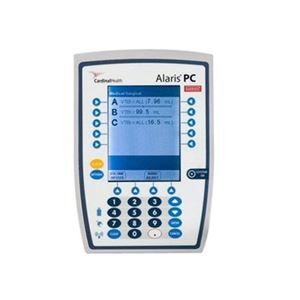
Alaris 8200 Infusion Pump
Serial number: 654E3
Alaris 8200 Infusion Pump
Last maintenance: July 25, 2026
Describe Issue
Pump does not seem to be infusing correctly. Display showing error
Photo Upload
Tap to add a photo
Reported By
steven.neal@svhc.org
Submit
Field first workflows
From asset management → asset intelligence
Traditional asset management
Records in a database, updated after the fact.
Information lives in back-office systems, disconnected from the people standing in front of the asset who need answers in the moment.
Openscreen Atlas
Contextual, intuitive, field-first intelligence.
The right information and the right workflow for that specific asset, delivered to the stakeholder exactly when and where they need it — no app, no login.
01 How Atlas works

From a physical object to an intelligent touchpoint — no code.

Atlas turns any asset into an interactive experience in a few straightforward, configurable steps. Here are the four that form the backbone.

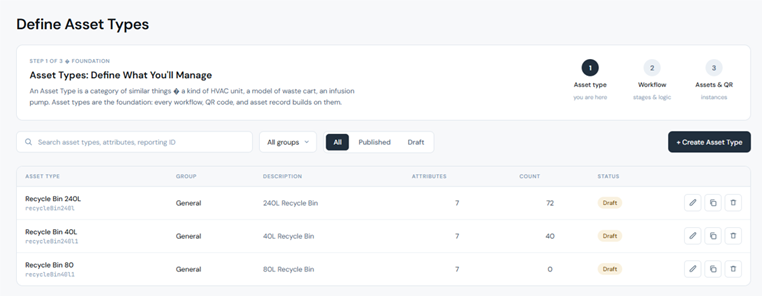
1Define your asset types

Start with what you manage.

An Asset Type is a blueprint for a class of asset — a model of waste cart, a type of pump, a category of router — with its own fixed attributes (serial number, manufacturer, install date) and operational attributes.

Every workflow, QR code, and asset record builds on this foundation.

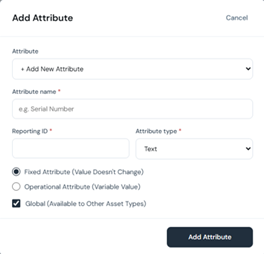
No-code attribute builder — fixed, operational, and global fields
Default assetID & assetType on every type
No schema migrations, no engineering involvement
os-atlas.co/define-asset-types.html
Define Asset Types
Add attribute modal
2Build work order templates

Standardize how work gets done.

Configure reusable work order templates with the exact elements your teams need — form fields, status flows, and button actions that drive the work forward.

Define once, apply everywhere. The same page-element editor powers templates and workflows alike, with a live mobile preview as you build.

Asset Attribute, Photo Upload, text & button elements
Per-element properties: label, layout, border, spacing
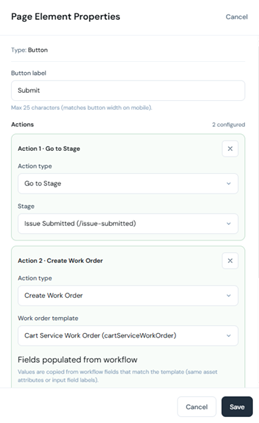
Submit button actions wire straight into work orders
os-atlas.co/workflow-editor.html?workOrder=1
Edit Work Order Template
Page element properties
3Design workflows

Where intelligence reaches the field.

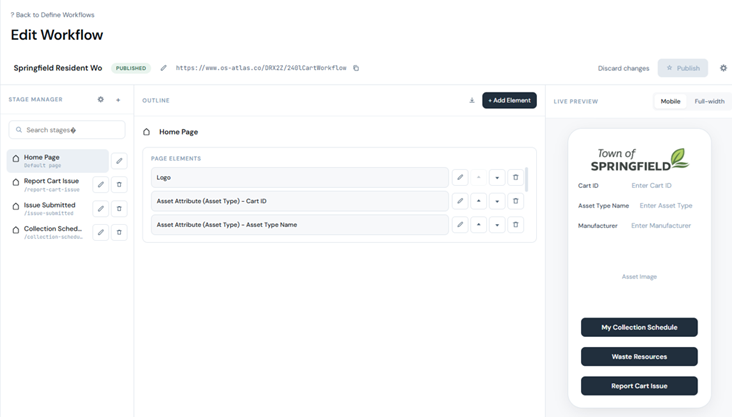
A Workflow is a process twinned to an asset — represented by an asset-specific URL and triggered by a QR scan. Using a no-code editor, you assemble multi-stage experiences with page elements, properties, and button actions.

Button actions go further than forms: Go to Stage, Send Email, or Create Work Order — with fields auto-populated from the workflow into the matching template.

Stage manager, outline, and live mobile preview
Configure once at the asset-type level — every instance inherits it
Branded, multi-stage resident & technician experiences
os-atlas.co/workflow-editor.html?id=CartWorkflow
Edit Workflow — Springfield Resident Workflow
Button actions — Go to Stage, Create Work Order
4Generate assets & QR

From blueprint to thousands of live assets.

Create individual asset instances at scale — manually or by CSV — and link each one to its workflow. Every instance receives its own unique, serialized QR identity: the bridge between the physical object and its digital twin.

Because each QR is unique to its asset, scanning loads that asset's details automatically — field users never re-enter what the platform already knows.

Auto-incrementing IDs with a name prefix
One motion to tag, deploy, and scan
Each asset resolves to its own workflow URL
os-atlas.co/generate-assets.html
Assets — physical instances & QR codes
STEP 05

Manage work orders

Raise work orders against any asset instance from the admin console, with asset details pre-populated. Track, update, and close through the full lifecycle.

STEP 06

Engage in the field

Anyone who scans lands on the asset's workflow with details already loaded. A resident reports a damaged cart; a technician logs an inspection — in seconds, from a phone.

STEP 07

Report & act

Activity flows into structured reporting — a real-time, portfolio-wide view of every asset, every interaction, and every open work order.

RESULT

Continuous intelligence

Asset management shifts from periodic and reactive to continuous and intelligent — driven by interaction at the point of interaction.

02 Key features

Everything you need to make every asset intelligent.

QR-native digital twinning

Every asset carries a unique, serialized QR that resolves instantly to its own digital experience — no app, no login for field users.

No-code asset type builder

Define asset classes and their attributes — fixed and operational — through a configuration UI. No schema migrations, no engineering.

Visual workflow editor

Assemble multi-stage, asset-specific workflows with configurable page elements and button actions. Configure once; every instance inherits it.

Pre-populated field experiences

Because each QR is unique to its asset, scanning loads that asset's details automatically — users never re-enter what Atlas knows.

Integrated work order management

Create, assign, update, and close work orders against any asset instance, with templates that standardize how work gets done.

Asset generation at scale

Spin up thousands of asset instances and link them to workflows in a single motion — ready to tag, deploy, and scan.

Real-time asset reporting

A live, structured view across the entire portfolio — activity, status, and open work orders, all in one place.

Multi-tenant & role-based

Enterprise-grade tenancy isolation with platform admin users and workflow users — the right people get the right access.

One platform, any asset

From bins to broadband — schema-flexible types and configurable workflows serve every asset class on a single platform.

03 Key benefits

Why teams choose Atlas.

01

Act in seconds, not systems

Field teams capture and act on asset data in the moment — at the point of interaction — instead of returning to a desk to update a back-office system.

02

Engage every stakeholder

Atlas extends asset interaction beyond the maintenance team to everyone who touches the asset — employees, contractors, residents, customers.

03

Deploy in days, not quarters

No-code configuration replaces lengthy, six-figure CMMS implementations. Define your types and workflows, generate assets, and go live.

04

One platform for every asset

Schema-flexible types and configurable workflows let a single platform serve facilities, healthcare, telecom, municipal, and more.

05

Proactive, not reactive

Continuous field interaction feeds a real-time portfolio view, shifting asset management from periodic and reactive to continuous and intelligent.

06

A strategic advantage

With mobile enablement and intelligence at the point of interaction, Atlas transforms asset management from a cost center into a differentiator.

The bottom line

The blueprint for the next generation of asset management — where every asset is intelligent, every interaction is captured, and every stakeholder is engaged.

From bins to broadband — one platform for intelligence at every point of interaction.